RealPro vs Thumbtack for Homeowners: Which Is Better in 2026?

If you're searching for RealPro vs Thumbtack, you're probably trying to answer one practical question: which platform helps a homeowner hire a trustworthy pro faster, with less risk and less hassle? Both connect you with people who can fix, paint, clean, or remodel. The difference is how those pros are screened, how they reach you, and how protected you are once money and work begin.
This guide breaks down RealPro.one and Thumbtack from a homeowner's point of view — verification, requests vs leads, pricing clarity, messaging, payments, and overall peace of mind — so you can choose the better fit for your next job.
Quick verdict: RealPro vs Thumbtack
- Choose RealPro.one if you want every pro background-checked before they can contact you, itemized requests in one place, live arrival tracking, and secure in-app payments with digital invoices.
- Thumbtack can work if you want a large open marketplace and are comfortable vetting pros yourself, fielding multiple outreach messages, and handling payment and follow-up outside a single protected flow.
- For safety-sensitive jobs — plumbing, electrical, HVAC, or anything inside your home — a platform that vets first tends to reduce risk more than one that leaves screening mostly to you.
How each platform works for homeowners
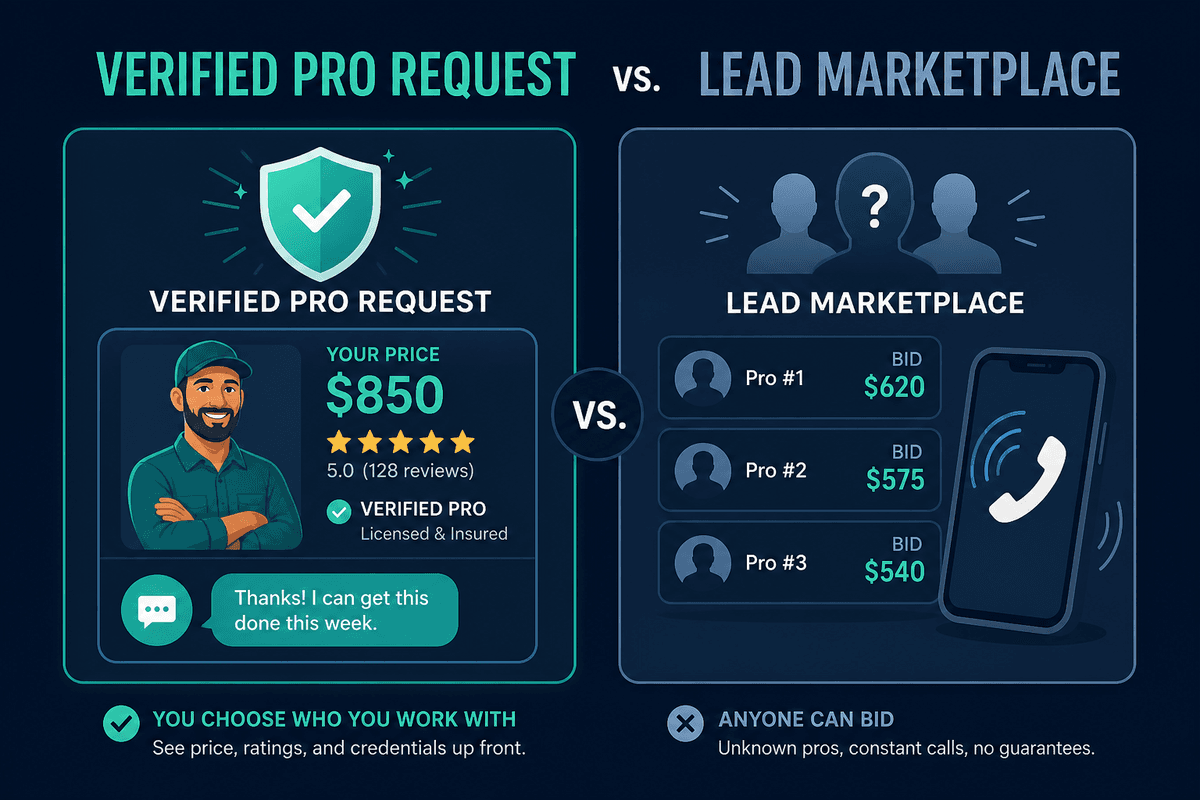
Thumbtack is primarily a lead marketplace. You describe a project, and interested pros can respond. That reach is useful, but it often means more outreach to sort through — and more homework to confirm licenses, insurance, and reputation on your own.
RealPro.one is built as an end-to-end hiring app. You post a job (with an AI composer if you want help writing it), set a budget, and compare requests from local pros who have already passed identity and background checks. Chat, hire, live tracking, and payment stay in one place so you're not stitching the job together across texts, calls, and cash apps.
Verification: who can contact you?
This is the biggest RealPro vs Thumbtack difference for most homeowners. On RealPro.one, pros are verified before they can send a request — identity confirmation, background check, and proof of insurance are part of getting onto the platform. The goal is simple: when someone knocks on your digital door, basic trust work is already done.
On a broader lead marketplace, "available" does not always mean "vetted to the same standard." You may still need to ask for license numbers, insurance certificates, and references yourself. That can be fine if you enjoy the research — but it's easy to skip when a pipe is leaking or guests arrive tomorrow.
Requests vs leads: how quotes actually feel
- RealPro: post once, then compare structured requests — pricing, ratings, and reviews from completed jobs — in a clean side-by-side view.
- Thumbtack-style lead flow: pros compete for your project; you may get several calls or messages that vary widely in detail and professionalism.
- Homeowner tip: itemized quotes beat vague ballparks. If labor and materials aren't broken out, keep asking — or choose a platform that encourages clear requests by default.
Payments, tracking, and what happens after you hire
Hiring is only half the job. RealPro keeps the rest inside the app: messaging, hire confirmation, live tracking when your pro is en route, secure payment, and a digital invoice. That paper trail matters if something goes wrong — and it keeps your card details off a stranger's phone.
With many marketplace hires, payment and scheduling move to text, Venmo, cash, or a personal invoice. That can work with a pro you already trust. For a first-time hire, off-platform payment is also where scams and "deposit then disappear" stories often start.

Feature comparison for homeowners
- Pro vetting before contact: RealPro requires it; on Thumbtack, expect to verify credentials yourself more often.
- Job posting: both let you describe work; RealPro adds an AI job composer for clearer posts from plain language.
- Comparing options: RealPro focuses on in-app request comparison; Thumbtack emphasizes matching you with interested pros at scale.
- Live arrival tracking: built into RealPro once a pro is hired and on the way; not a core Thumbtack homeowner experience.
- Secure in-app pay + invoice: standard on RealPro; often handled separately after a Thumbtack introduction.
- Best for: RealPro for protected, app-native hiring; Thumbtack for browsing a large open pool if you're ready to screen thoroughly.
Which should you use for common home jobs?
For emergencies and trades that enter your home — plumbing leaks, electrical issues, HVAC, lock-related work — prioritize verification, reviews tied to real jobs, and protected payment. That's where RealPro.one is designed to shine.
For lower-risk or highly researched projects where you already have a shortlist and enjoy interviewing pros, a large marketplace can still be useful. Even then, insist on written itemized quotes, proof of insurance, and a payment method you can document.
Bottom line: if you want a modern homeowner experience with verification up front and protection through payment, RealPro.one is the stronger fit. If you prefer a wide open marketplace and don't mind doing the screening yourself, Thumbtack remains a familiar option — just hire carefully. Look past ad claims: ask who is screened before contact, whether reviews come from completed paid jobs, and whether payment stays protected — those answers usually decide RealPro vs Thumbtack more clearly than feature checklists alone.
Frequently asked questions
- Is RealPro a good Thumbtack alternative for homeowners?
- Yes. RealPro.one is a strong Thumbtack alternative if you want pros background-checked before they contact you, side-by-side requests, live arrival tracking, and secure in-app payments with digital invoices.
- What is the biggest RealPro vs Thumbtack difference?
- Verification before contact. RealPro requires identity checks, background screening, and insurance documentation before pros can send requests. On broader lead marketplaces, homeowners often do more of that screening themselves.
- Which is safer for hiring plumbers or electricians?
- For safety-sensitive trades inside your home, platforms that vet first and keep payment documented are generally safer than open marketplaces where quotes, chat, and payment can move off-platform.
- Does Thumbtack still make sense for some jobs?
- It can, especially if you want a large open pool of pros and are willing to verify licenses, insurance, and reviews yourself. For protected, app-native hiring with less homework, RealPro is the better fit.